How to design scalable Snowflake RBAC with personas and privilege sets
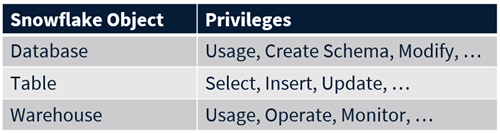
- Databases support USAGE, CREATE SCHEMA, and MODIFY
- Tables support SELECT, INSERT, and UPDATE
- Warehouses support USAGE, OPERATE, and MONITOR
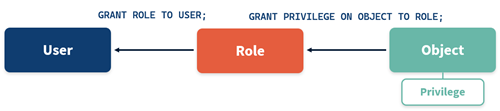
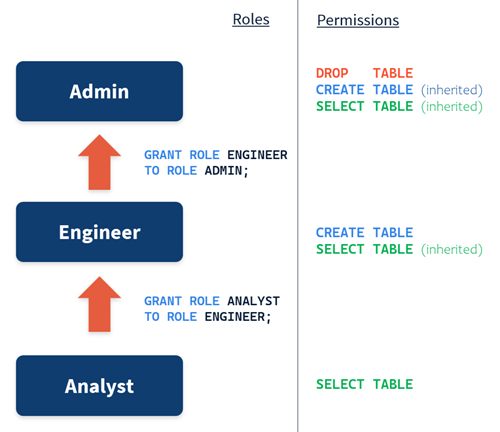
- ANALYST → sits at the base and is granted the SELECT privilege on a table
- ENGINEER → is the parent of Analyst so it inherits the SELECT privilege and also receives its own CREATE TABLE grant
- ADMIN → sits at the top and inherits SELECT + CREATE TABLE, and is additionally granted the DROP TABLE privilege directly
- Least-privilege
Construct your roles so that each user type receives only the minimum level of access they need to perform their job. Snowflake’s fine-grained privilege system makes this entirely achievable, but you have to design for it. - Clear and understandable
The flexibility of Snowflake’s privilege model means you can create a mess very quickly if permissions are granted on an ad-hoc basis. Your role structure should be something that anyone on the team can read, understand, and reason about. - Lean on inheritance
Use your role hierarchy to avoid duplicating grants. Refrain from granting the same privilege to multiple roles within the same hierarchy — instead, grant it to the lowest relevant role and let parent roles inherit it. For example, grant Select on a table to the Analyst role; do not also grant it to the Engineer role, because the Engineer already inherits it.
- Account roles
Account roles are the original role type. They are globally scoped across your entire Snowflake account and can hold privileges on any object within it. - Database roles
Database roles are scoped to a single database. A database role can only hold privileges on objects within the database it belongs to. This creates a clear, implicit boundary on what the role can access. Database roles are referred to using a two-part naming convention — the database name and the role name — such as Staging.DR_CREATE or Presentation.DR_READ. This naming convention makes it immediately obvious which database a role belongs to and what kind of access it provides.
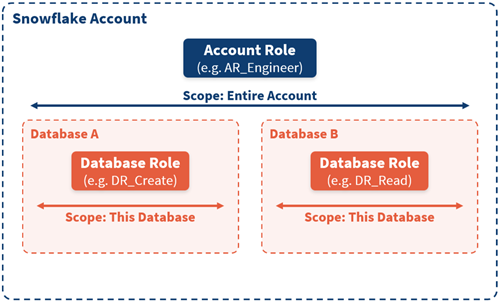
- AR_ADMIN
- AR_ENGINEER
- AR_ANALYST
- DR_CREATE
- DR_READ
- DR_EXECUTE
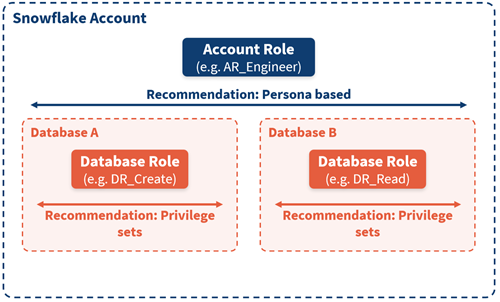
- AR_ = account roles (personas)
- DR_ = database roles (privilege sets)
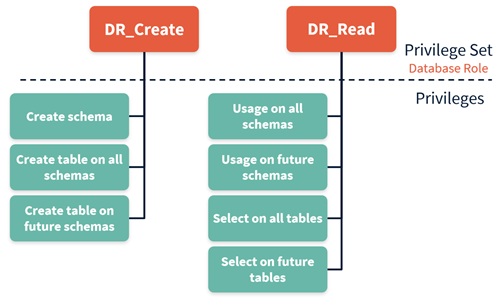
- CREATE SCHEMAS
- CREATE TABLE (current and future schemas)
- USAGE on all schemas
- SELECT on all tables (current and future)
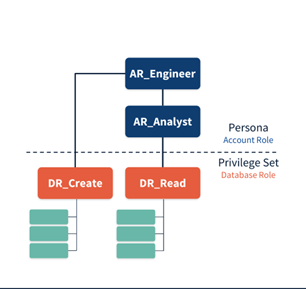
- AR_ANALYST → DR_READ
- AR_ENGINEER → DR_READ + DR_CREATE
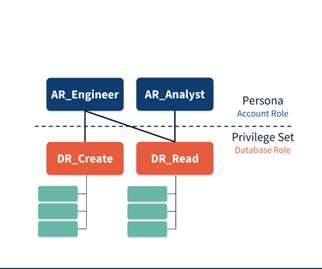
- DR_READ is granted once (to ANALYST)
- ENGINEER only needs DR_CREATE explicitly
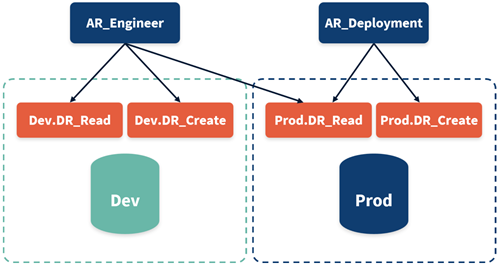
- Engineers have READ and CREATE access in DEVELOPMENT
- Engineers have READ-only access in PRODUCTION
- CI/CD or DEPLOYMENT roles manage PRODUCTION changes
- A dedicated AR_DEPLOYMENT role can be introduced for production write access.
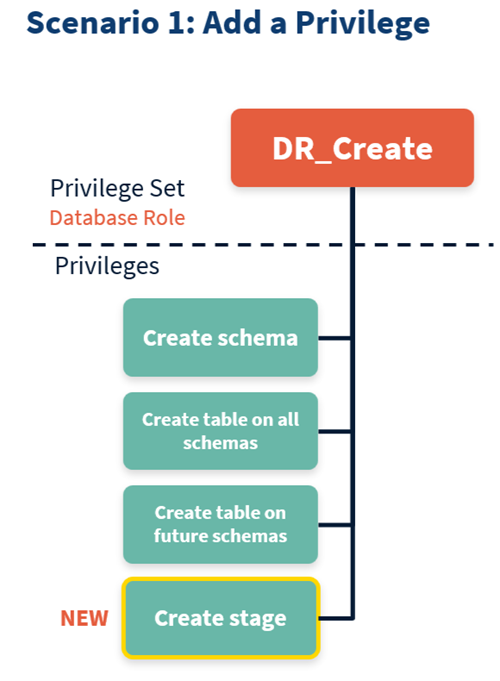
- Scenario 1: Adding a new privilege.
Suppose your engineers need the ability to create stages. Rather than touching persona grants or reconfiguring role hierarchies, you simply add the CREATE STAGE privilege to the existing DR_CREATE set. Every persona that inherits that set automatically gains the new capability. - Scenario 2: Adding environment access.
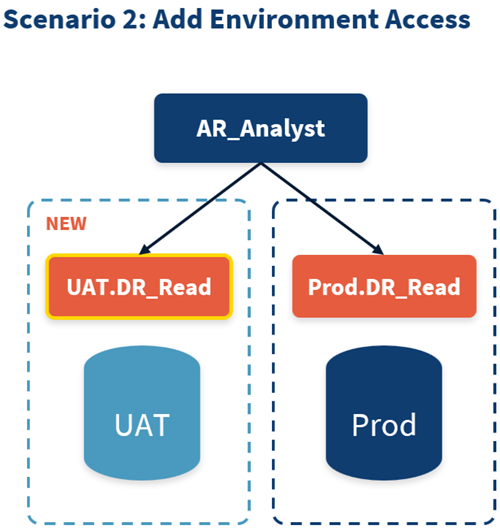
Perhaps you originally gave your analysts read access only in Production, but you now want them to review reporting model changes in a UAT environment before release. You simply grant the DR_READ privilege set in the UAT database to the ANALYST persona. No restructuring required.
- Personas (AR_*): account roles represent users and job functions of people in your organisation
- Privilege sets (DR_*): database roles represent the actions those people need to perform scoped tightly to a single database, and define reusable permission bundles
- Privilege inheritance keeps grants minimal and avoids duplication
- When requirements change — as they inevitably do — the model extends gracefully