Vizify Analytics

How to design scalable Snowflake RBAC with personas and privilege sets

How to design scalable Snowflake RBAC with personas and privilege sets

Snowflake’s role-based access control (RBAC) system is one of the platform’s most powerful security features, but also one of the trickiest to get right. The way Snowflake handles roles and permissions is highly customisable, which is a huge strength when used deliberately. However, without careful planning, organisations can quickly find themselves in a tangle of ad-hoc grants, unclear role boundaries, and permissions that are difficult to audit or maintain.

In this post, we walk through how Snowflake’s permission model works from the ground up, cover the best practice principles you should follow, and then present our recommended pattern for structuring access controls: a combination of Personas and Privilege Sets. Whether you are just getting started or looking to tighten up an existing deployment, this guide will help you build a clean, scalable RBAC framework.

Understanding Snowflake privileges and roles

At the heart of Snowflake’s security model are privileges. Every Snowflake object type — databases, tables, warehouses, schemas, and more — has a set of privileges that define what actions can be performed on it.

For example:

  • Databases support USAGE, CREATE SCHEMA, and MODIFY
  • Tables support SELECT, INSERT, and UPDATE
  • Warehouses support USAGE, OPERATE, and MONITOR
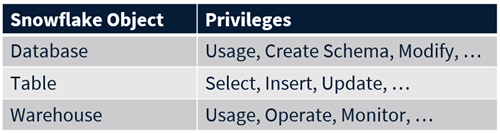
Figure 1: Snowflake object types and their associated privileges

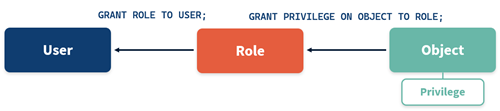
Crucially, privileges in Snowflake are granted to roles, not directly to users. Roles are then granted to individual users.

Figure 2: Privileges are granted to roles, and roles are granted to users

This separation is what makes the system scalable. Instead of configuring permissions per user from scratch, you define a set of roles that represent the different groups within your organisation and assign users to the appropriate role. When a new analyst joins, for instance, you simply grant them the ANALYST role and they immediately inherit the correct set of permissions.

Role hierarchy and privilege inheritance

Roles in Snowflake can be granted not only to users but also to other roles, forming a hierarchy. When a child role is granted to a parent role, all of the child’s privileges automatically flow upward through the hierarchy. This is known as privilege inheritance.

Consider a simple three-tier structure:

  • ANALYST → sits at the base and is granted the SELECT privilege on a table
  • ENGINEER → is the parent of Analyst so it inherits the SELECT privilege and also receives its own CREATE TABLE grant
  • ADMIN → sits at the top and inherits SELECT + CREATE TABLE, and is additionally granted the DROP TABLE privilege directly
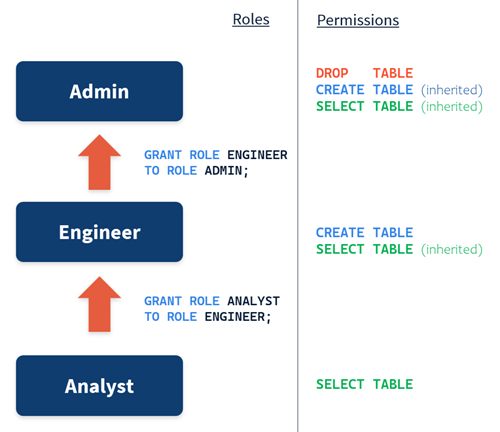
Figure 3: A three-tier role hierarchy showing privilege inheritance

This inheritance model is powerful because it means you only need to define a privilege once at the lowest appropriate level. Every role above it in the hierarchy automatically picks up that permission without any additional configuration.

Access controls best practices

Before diving into our recommended structural pattern, it is worth establishing three guiding principles for Snowflake access control design.

  • Least-privilege
    Construct your roles so that each user type receives only the minimum level of access they need to perform their job. Snowflake’s fine-grained privilege system makes this entirely achievable, but you have to design for it.
  • Clear and understandable
    The flexibility of Snowflake’s privilege model means you can create a mess very quickly if permissions are granted on an ad-hoc basis. Your role structure should be something that anyone on the team can read, understand, and reason about.
  • Lean on inheritance
    Use your role hierarchy to avoid duplicating grants. Refrain from granting the same privilege to multiple roles within the same hierarchy — instead, grant it to the lowest relevant role and let parent roles inherit it. For example, grant Select on a table to the Analyst role; do not also grant it to the Engineer role, because the Engineer already inherits it.

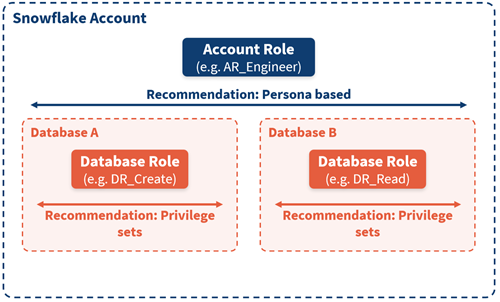
Account roles vs database roles

Snowflake offers two types of roles, and understanding the distinction between them is key to designing a scalable permission structure.

  • Account roles
    Account roles are the original role type. They are globally scoped across your entire Snowflake account and can hold privileges on any object within it.
  • Database roles
    Database roles are scoped to a single database. A database role can only hold privileges on objects within the database it belongs to. This creates a clear, implicit boundary on what the role can access. Database roles are referred to using a two-part naming convention — the database name and the role name — such as Staging.DR_CREATE or Presentation.DR_READ. This naming convention makes it immediately obvious which database a role belongs to and what kind of access it provides.
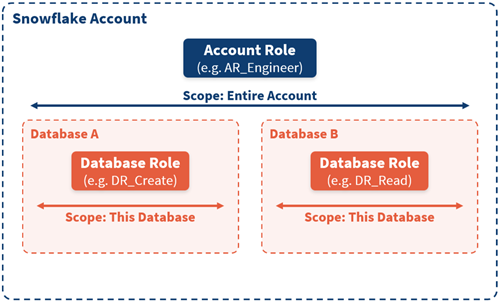
Figure 4: Account roles span the entire account; database roles are scoped to a single database

Our recommendation: Personas and Privilege Sets

We recommend using both role types together, each with a clearly defined purpose.

Account roles = Personas
These represent job functions within the organisation.

  • AR_ADMIN
  • AR_ENGINEER
  • AR_ANALYST

Database roles = Privilege sets
These represent reusable bundles of permissions scoped to a single database. The name of each privilege set should clearly describe the actions it enables.

  • DR_CREATE
  • DR_READ
  • DR_EXECUTE

Throughout this guide, we use the naming convention:

  • AR_ = account roles (personas)
  • DR_ = database roles (privilege sets)
Figure 5: Personas (account roles) and privilege sets (database roles) working together

1. Defining your privilege sets

Privilege sets are defined once and reused across databases. For example:

DR_CREATE may include:

  • CREATE SCHEMAS
  • CREATE TABLE (current and future schemas)

DR_READ may include:

  • USAGE on all schemas
  • SELECT on all tables (current and future)
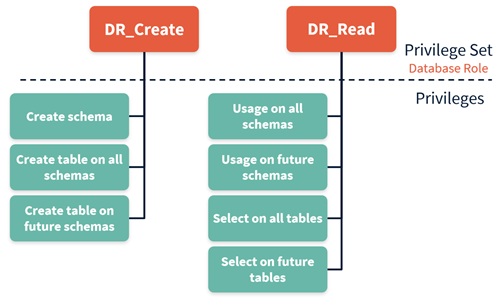
Figure 6: Privilege sets and their constituent grants

The key advantage of this approach is reusability. Once you have designed the recipe of grants for a particular privilege set, you can replicate it across every database in your account. If you understand what the CREATE set does in your staging database, you know exactly how it will behave in your presentation database as well. We recommend using the combination of ALL and FUTURE grants to keep things simple and ensure new objects are automatically covered.

2. Connecting privilege sets to personas

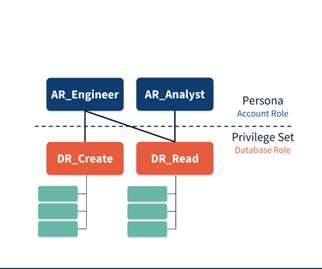
With your privilege sets defined, the next step is to grant them to the appropriate personas. An analyst persona typically only needs to read data from existing tables, so you would grant the DR_READ privilege set to AR_ANALYST. An engineer, on the other hand, needs to both create new objects and read from existing ones, so you would grant both DR_CREATE and DR_READ to AR_EENGINEER.

  • AR_ANALYST → DR_READ
  • AR_ENGINEER → DR_READ + DR_CREATE
Figure 7: Granting privilege sets to persona roles

3. Applying role hierarchy to simplify grants

Remember the role hierarchy we discussed earlier? If the ENGINEER persona is already the parent of the ANALYST persona, then AR_ENGINEER will automatically inherit everything granted to AR_ANALYST — including the DR_READ privilege set. This means you only need to grant DR_CREATE directly to the ENGINEER; the READ permissions flow up through the hierarchy for free.

This is where careful design pays off. By combining persona hierarchies with privilege sets, you end up with a permission model that is both minimal and complete: every role has exactly the access it needs, and no grant is duplicated.

  • DR_READ is granted once (to ANALYST)
  • ENGINEER only needs DR_CREATE explicitly
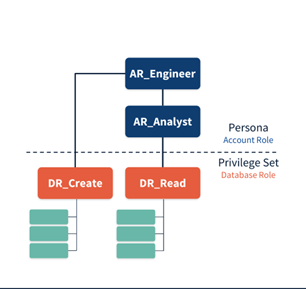
Figure 8: Persona hierarchy with privilege set inheritance

This is where careful design pays off. By combining persona hierarchies with privilege sets, you end up with a permission model that is both minimal and complete: every role has exactly the access it needs, and no grant is duplicated.

4. Extending to multiple environments

The real power of this pattern becomes clear when you need to support multiple environments within a single Snowflake account — for example, a DEVLOPMENT database and a PRODUCTION database.

In a well-designed system, only your CI/CD pipeline should have the ability to deploy and modify objects in production. This ensures that every object in production has been version-controlled, reviewed, and released through your standard deployment process. Your engineers, meanwhile, should be able to read data in both environments but only create objects in development. i.e.

  • Engineers have READ and CREATE access in DEVELOPMENT
  • Engineers have READ-only access in PRODUCTION
  • CI/CD or DEPLOYMENT roles manage PRODUCTION changes
  • A dedicated AR_DEPLOYMENT role can be introduced for production write access.
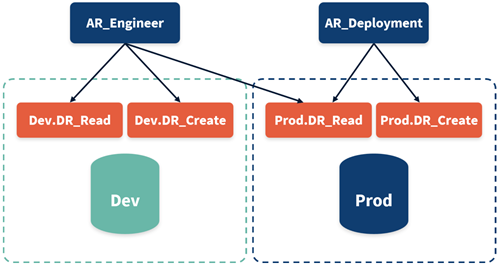
Because privilege sets are bounded to a single database, the boundaries are inherently clear: there is no risk of an engineer’s development permissions accidentally spilling over into production.

Figure 9: Multi-environment access control with personas and privilege sets

5. Easy to expand

Once your privilege sets and personas are in place, expanding them to handle new requirements is a simple and predictable process, that ensures changes remain localised, predictable, and easy to audit.

  • Scenario 1: Adding a new privilege.
    Suppose your engineers need the ability to create stages. Rather than touching persona grants or reconfiguring role hierarchies, you simply add the CREATE STAGE privilege to the existing DR_CREATE set. Every persona that inherits that set automatically gains the new capability.
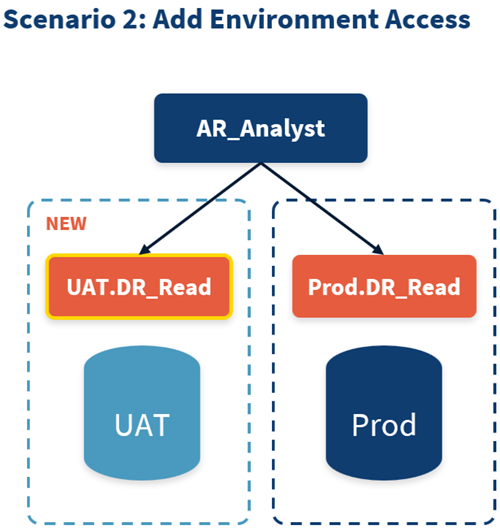
  • Scenario 2: Adding environment access.
    Perhaps you originally gave your analysts read access only in Production, but you now want them to review reporting model changes in a UAT environment before release. You simply grant the DR_READ privilege set in the UAT database to the ANALYST persona. No restructuring required.
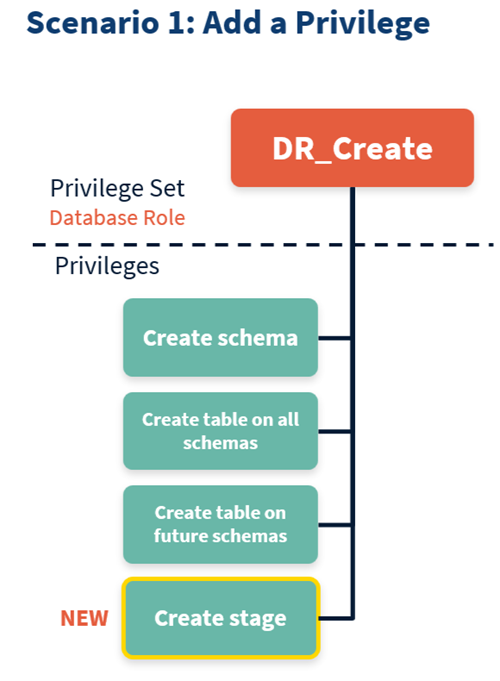
Figure 10a: Scenario 1 (add a privilege)
Figure 10b: Scenario 2 (add environment access)

Conclusion

Snowflake’s RBAC access control system is flexible enough to support virtually any organisational structure, but that flexibility is a double-edged sword. Without a deliberate approach, permissions can quickly become a tangled web that is difficult to understand, audit, or maintain.

The Personas and Privilege Sets model provides a clean, scalable framework for Snowflake RBAC:

  • Personas (AR_*): account roles represent users and job functions of people in your organisation
  • Privilege sets (DR_*): database roles represent the actions those people need to perform scoped tightly to a single database, and define reusable permission bundles
  • Privilege inheritance keeps grants minimal and avoids duplication
  • When requirements change — as they inevitably do — the model extends gracefully
Whether you are building a new Snowflake deployment or looking to bring order to an existing one, we strongly recommend adopting this pattern. Design your roles with intention, lean on inheritance, and keep your privilege sets reusable. Your future self — and your governance team — will thank you.

Ready to mobilise your data with Snowflake? 

Whether you’re a start-up or enterprise, our  Select Services Partnership and collaborative delivery model ensures tailored Snowflake solutions that enable smarter, data-driven decisions, and measurable business outcomes.

Stay tuned for more Snowflake tips and tricks, from our expert consultants.

Scroll to Top